(출처: https://www.kaggle.com/dogdriip/iqr-outlier-smote-oversampling/notebook)
0. 라이브러리 설치
import numpy as np
import pandas as pd
import matplotlib.pyplot as plt
import seaborn as sns
%matplotlib inline
1. 데이터 불러오기
card_df = pd.read_csv('creditcard.csv')
card_df = card_df.drop('Time', axis=1)
card_df.shape
# >(284807, 30)
2. EDA
sns.distplot(card_df['Amount'])
- 로그 변환 : 데이터 분포도가 심하게 왜곡되어 있을 경우 적용하는 기법 중 하나
- 원래 값을 log 값으로 변환해 원래 큰 값을 상대적으로 작은 값으로 변환하기 때문에 데이터 분포도의 왜곡을 상당 수준 개선해 줍니다.
sns.distplot(np.log1p(card_df['Amount']))
card_df['Amount'] = np.log1p(card_df['Amount'])
3. Outlier 탐지 및 제거
- 상관성이 높은 피쳐 위주로 이상치 검출할 때, 성능이 향상된다.
plt.figure(figsize=(9, 9))
sns.heatmap(card_df.corr(), cmap='RdBu')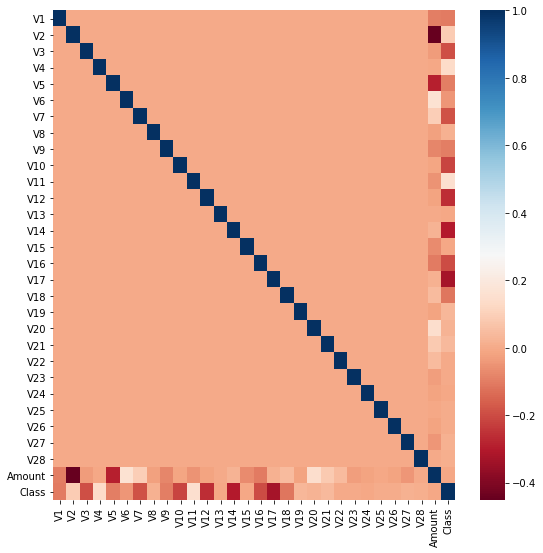
- Label Feature, Class와 음의 상관관계가 가장 높은 것은 V14, V17
- 상관성이 높은 Feature에서의 이상치를 삭제하는 것이 모델 성능 향상에 도움이 되니 아래 코드로 IQR 기반의 이상치를 찾아본다.
# IQR 방식 : 1.5*Q1 <= Data <= 1.5*Q3 이 아닌 데이터는 이상치로 여긴다
fraud_df = card_df[card_df['Class'] == 1]

for col in ['V14', 'V17']:
    fraud = fraud_df[col]
    quantile_25 = np.percentile(fraud.values, 25)
    quantile_75 = np.percentile(fraud.values, 75)

    iqr = quantile_75 - quantile_25
    iqr_weight = iqr * 1.5

    lowest_val = quantile_25 - iqr_weight
    highest_val = quantile_75 + iqr_weight

    outlier_index = fraud[(fraud < lowest_val) | (fraud > highest_val)].index
    print(col, '이상치 데이터 인덱스:', outlier_index)
card_df = card_df.drop([8296, 8615, 9035, 9252])
4. SMOTE 오버샘플링
Problem
레이블이 불균형한 분포를 가진 데이터 세트를 학습시킬 때 예측 성능의 문제가 발생할 수 있다.
Why?
이상 레이블을 가지는 데이터 건수 <<< 정상 레이블을 가진 데이터 건수
이상 레이블을 가지는 데이터가 매우 적어 다양한 유형을 학습할 수 없기 때문에, 정상 레이블로 치우친 학습을 수행하게 되어 제대로 된 데이터 검출이 어려워진다.
Solution
오버 샘플링
: 이상 데이터와 같이 적은 데이터 세트를 증식하여 학습을 위한 충분한 데이터를 확보하는 방법
- 원본 데이터의 피쳐 값들을 아주 약간만 변경하여 증식
- 대표적인 방법 : SMOTE(Synthetic Minority Over-sampling Technique)
- SMOTE : 적은 데이터 세트에 있는 개별 데이터들의 K-Nearest-Neighbor를 찾아서 이 데이터와 K개 이웃들의 차이를 일정 값으로 만들어서 기존 데이터와 약간 차이가 나는 새로운 데이터들을 생성하는 방식
- SMOTE를 적용할 때는 반드시 학습 데이터 세트만 오버 샘플링
1) Training/Test Split
from sklearn.model_selection import train_test_split
X_train, X_test, y_train, y_test = train_test_split(card_df.iloc[:, :-1], card_df.iloc[:, -1], test_size=0.3, stratify=card_df.iloc[:, -1])
print('학습 데이터 레이블 값')
print(y_train.value_counts())
print('테스트 데이터 레이블 값')
print(y_test.value_counts())
print()
print('학습 데이터 레이블 값 비율')
print(y_train.value_counts() / y_train.shape[0] * 100)
print('테스트 데이터 레이블 값 비율')
print(y_test.value_counts() / y_test.shape[0] * 100)
2) SMOTE
# 가상환경/Colab 실습 권장
#conda install -c conda-forge imbalanced-learn==0.7.0

from imblearn.over_sampling import SMOTE
smote = SMOTE()
X_train_over, y_train_over = smote.fit_sample(X_train, y_train)

print('SMOTE 적용 전 학습용 피처/레이블 데이터 세트:', X_train.shape, y_train.shape)
print('SMOTE 적용 후 학습용 피처/레이블 데이터 세트:', X_train_over.shape, y_train_over.shape)

print('SMOTE 적용 전 레이블 값 분포:')
print(y_train.value_counts())
# > 199020, 342

print('SMOTE 적용 후 레이블 값 분포:')
print(y_train_over.value_counts())
# > 199020, 199020
3) 모델 학습 및 평가
- SMOTE 이전/이후 확실하게 비교하는 것이 좋다.
- SMOTE를 적용하면 재현율은 높아지나, 정밀도는 낮아지는 것이 일반적
### SMOTE 적용 이전
from sklearn.metrics import accuracy_score, confusion_matrix, precision_score
from sklearn.metrics import recall_score, f1_score, roc_auc_score

lgbm_clf_without_over = LGBMClassifier(n_estimators=1000, num_leaves=64, n_jobs=-1, boost_from_average=False)

lgbm_clf_without_over.fit(X_train, y_train) # Over-sampling 이전

pred = lgbm_clf_without_over.predict(X_test)
pred_proba = lgbm_clf_without_over.predict_proba(X_test)[:, 1]

confusion = confusion_matrix(y_test, pred)
accuracy = accuracy_score(y_test, pred)
precision = precision_score(y_test, pred)
recall = recall_score(y_test, pred)
f1 = f1_score(y_test, pred)
roc_auc = roc_auc_score(y_test, pred_proba)

print('Confusion matrix:')
print(confusion)
print('Accuracy(정확도):', accuracy)
print('Precision(정밀도):', precision)
print('Recall(재현율):', recall)
print('F1:', f1)
print('ROC_AUC:', roc_auc)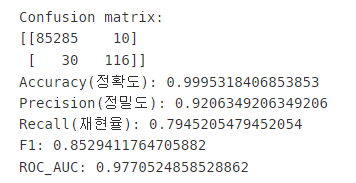
### SMOTE 적용 이후
lgbm_clf = LGBMClassifier(n_estimators=1000, num_leaves=64, n_jobs=-1, boost_from_average=False)

lgbm_clf.fit(X_train_over, y_train_over) # Over-sampling 이후

pred = lgbm_clf.predict(X_test)
pred_proba = lgbm_clf.predict_proba(X_test)[:, 1]

confusion = confusion_matrix(y_test, pred)
accuracy = accuracy_score(y_test, pred)
precision = precision_score(y_test, pred)
recall = recall_score(y_test, pred)
f1 = f1_score(y_test, pred)
roc_auc = roc_auc_score(y_test, pred_proba)

print('Confusion matrix:')
print(confusion)
print('Accuracy(정확도):', accuracy)
print('Precision(정밀도):', precision)
print('Recall(재현율):', recall)
print('F1:', f1)
print('ROC_AUC:', roc_auc)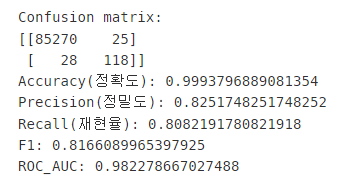
'멋쟁이 사자처럼 AI SCHOOL 5기 > Today I Learned' 카테고리의 다른 글
| [6주차 총정리] 데이터프레임 ERROR (0) | 2022.04.24 |
|---|---|
| [5주차 총정리] 결측값: pd.isnull(notnull), np.isnan으로만 확인 가능 + 결측행 뽑기 (0) | 2022.04.17 |
| [5주차 총정리] 결측값 시각화 (Missingno) (0) | 2022.04.14 |
| [5주차 총정리] Feature-transformer를 위한 파이프라인 (numerical, categorical features에 모두 접근 가능) (0) | 2022.04.13 |
| [5주차 총정리] Model Stacking을 위한 vecstack (0) | 2022.04.13 |