1. lambda()
- lambda input : output
- input을 받아 output으로 뱉어주는 함수
- 따로 정의내리지 않고 일회용으로 잠깐 쓰기 위해 사용한다 -> 익명 함수 (Anonymous function)라고도 부름
squared_func([1,3,5,10,20], lambda x : x**2)
2. apply()
- df.apply(func, axis=0)
- 함수를 적용하는 함수
def linear_eq(x,a,b):
    return a*x+b

df.apply(linear_eq, args=(3,1))
- 주로 특정 행 또는 열에 함수를 적용할 때 많이 사용된다
- 데이터프레임을 다루다보면 lambda 함수와 자주 쓰이는 것을 볼 수 있다
- apply 함수가 lambda 함수와 함께 쓰이면:
# axis=0 (열, column)
# Jan, Feb, ... : column명
# 1월, 2월생 데이터만 x를 x+1으로 변환
df.apply(lambda x : x+1 if x.birth_month in ['Jan','Feb'] else x)


# axis=1 (행, row)
# A, B, C : column명
# x['B']>0인 행에 대해서만 적용
df.apply(lambda x : (np.square(x['A']),np.log(x['B']),x['C']) if x['B']>0 else x, axis=1)
- 데이터프레임으로 본다면:
# dict[칼럼명].apply(칼럼 내 데이터마다 적용할 함수)
# dict.get(key)는 value 를 return
# .get(key, default=None) : key값에 들어있지 않은 x의 경우, error 없이 대응할 수 있도록 default 값으로 설정해둠.
# 아래는 default값을 '구 없음'으로 설정

df['구별'] = df['관서명'].apply(lambda x: police_to_gu.get(x, '구 없음'))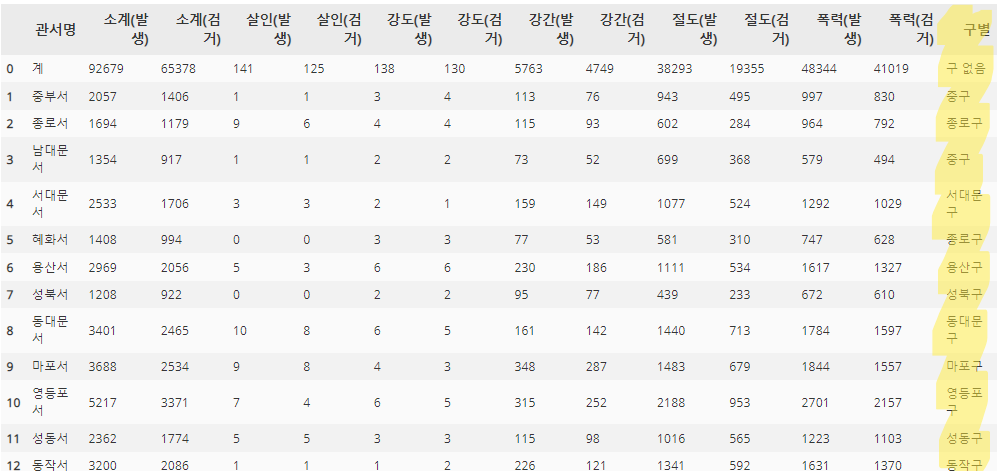
- 조금 더 복잡하게 쓰인다면:
(출처: https://data-newbie.tistory.com/207)
# species별로 평균 hp보다 더 높은 애들만 뽑고 싶을 때
species_hp_dict = df.groupby(["species"]).agg({"hp":"mean"}).to_dict()["hp"]

def bool_provider(hp , species) :
    return hp < species_hp_dict[species]

df[["hp","species"]][df.apply(lambda x : bool_provider(x["hp"], x["species"]), axis = 1)]
그리고, 아래와 같이 출력되는 것을 알 수 있습니다.

3. map()
- map(function, iterable)
- iterable : 반복 가능한 자료형 # list/dict/tuple/set/str/ range/enumerate/~~~
- map 객체로 반환시켜주기에 list, tuple로 형변환 시켜주어야 한다
- iterable을 하나씩 꺼내어 function을 적용해주는 함수
# np.round 함수
result1 = list(map(np.round, [1.1, 2.2, 3.3, 7.7, 8.8]))
result1


# add_one 함수
def add_one(x):
	return x+1
result2 = list(map(add_one, [1.1, 2.2, 3.3, 7.7, 8.8]))
result2
'멋쟁이 사자처럼 AI SCHOOL 5기 > Today I Learned' 카테고리의 다른 글
| [2주차 총정리] 데이터프레임 합치는 방법 (join, merge, concat) (0) | 2022.03.23 |
|---|---|
| [2주차 총정리] 데이터프레임에서의 Masking과 Filtering (0) | 2022.03.23 |
| [2주차 총정리] pd.DataFrame 기초 함수, hist 함수, pivot_table, 결측값 처리 방법 (0) | 2022.03.22 |
| [2주차 총정리] Python 초보자를 위한 class 기초 총정리 (0) | 2022.03.22 |
| [2주차 총정리] open 함수 이용하여 텍스트 파일(.txt, .csv, ...) 읽고 쓰기 (+ pickle과의 차이점) (0) | 2022.03.22 |